Stripe Connect Explained for Creators
Stripe Connect explained for creators: charge types, who pays fees, application fees, and the official pricing fork when Stripe or your platform sets rates.
application_fee_amount is Stripe Connect’s destination-charge take-rate. See Stripe’s $10/$1.23 example, who pays Stripe fees, and how on_behalf_of differs.

TL;DR:
application_fee_amountis the Stripe Connect parameter that pulls your marketplace’s cut back to the platform on a destination charge. Stripe’s docs use a $10.00 charge and a $1.23 fee: ~$0.59 Stripe fees hit the platform balance, leaving ~$0.64. It is noton_behalf_of, and it is not a published feat. fee table.
People search application_fee_amount when a Connect integration is about to ship and someone asks, “Where does our take-rate live?” The answer is a cents integer on a PaymentIntent—not a marketing page, and not a mystery “platform tax” invented in a blog.
This article explains application_fee_amount the way a founder who has sat on both sides of a split needs it: which charge type uses it, who pays Stripe’s fee, how on_behalf_of differs, and when separate charges and transfers are the cleaner ledger. It sits beside Stripe Connect explained for creators and how affiliate marketers get paid. It does not invent feat. listing fees or GMV.
Key takeaways:
transfer_data[destination]; application_fee_amount moves back to the platform (Stripe Docs).on_behalf_of is not a fee. It makes the connected account the settlement merchant (statement descriptor, country, fee structure) (Stripe Docs).application_fee_amount (Stripe Docs).application_fee_amount is a Stripe Connect PaymentIntent (or Checkout payment_intent_data) parameter that specifies, in the charge’s currency’s smallest unit, how much of a destination charge your platform keeps as an application fee.
When you create a destination charge with a fee, Stripe transfers the full captured charge to the connected account named in transfer_data[destination], then transfers the application_fee_amount back to the platform. The fee is capped at the total transaction amount and is always in the same currency as the charge (Stripe Docs).
You can also set fee rules in the Dashboard Platform Pricing Tool. Fees set in-code with application_fee_amount override those Dashboard rules (Stripe Docs). Treat the parameter as an explicit take-rate knob, not as optional decoration.
Units matter. Stripe expects the smallest currency unit—123 means $1.23 on a USD charge, not “123 dollars.” Teams that paste a percentage into that field without converting to cents ship a broken split on day one. Currency also matters: the application fee is always computed in the same currency as the transaction, and for some cross-border destination charges the fee can settle in the connected account’s settlement currency rather than the platform’s (Stripe Docs).
Marketplaces that skip this parameter do not get a “free” Connect. They get an accidental 0% platform cut—or they invent a shadow ledger outside Stripe and then reconcile in pain.
application_fee_amount is thinner than processor cost plus ops margin, the platform balance drifts negative (Stripe Docs).on_behalf_of.application_fee_amount is one way the rail encodes the slice. There is no public dataset for a universal “average marketplace take rate,” and this site will not invent feat.’s cut.| Job | Use application_fee_amount? |
Prefer instead |
|---|---|---|
| Destination charge, one seller, platform cut | Yes | — |
| Multi-party payout (restaurant + driver) | Often no | Separate charges & transfers; residual = fee |
| Cross-border settlement branding | Pair with on_behalf_of |
Not a substitute for the fee |
| Creator storefront on feat. | Live product config | Never paste a fake fee from a blog |
application_fee_amount works only as part of a charge-type choice. On destination charges it is an explicit pull-back. On separate charges and transfers your “fee” is usually whatever you do not transfer. on_behalf_of changes who appears as the merchant of record—it does not set the cents.
Three knobs get confused in every Connect review:
| Knob | What it sets | What it does not set |
|---|---|---|
application_fee_amount |
Platform cut on a destination charge (cents) | Statement descriptor, settlement country |
| Residual after transfers | Platform cut when using separate charges & transfers | Automatic Application Fee object (unless you add one) |
on_behalf_of |
Connected account as settlement merchant | Your take-rate percentage |
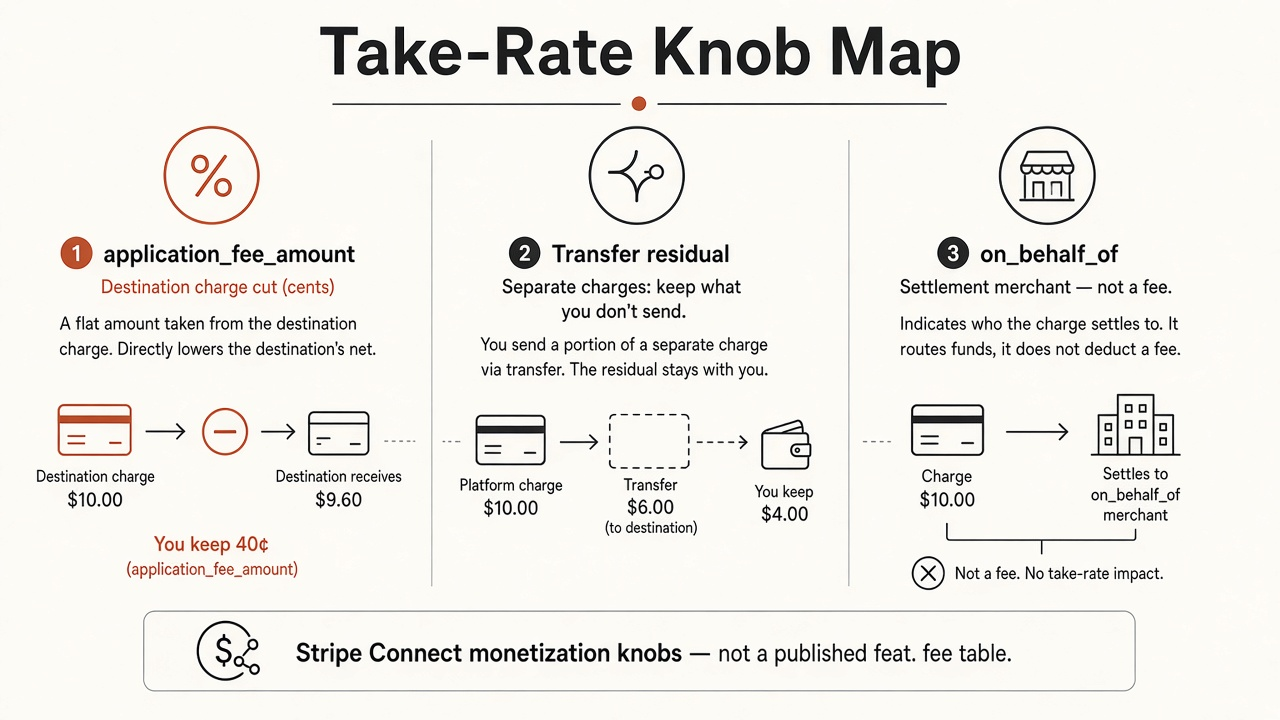
Source: feat. editorial framework from Stripe Docs — Collect application fees and Connect charges overview. https://docs.stripe.com/connect/marketplace/tasks/app-fees · https://docs.stripe.com/connect/charges
Stripe’s documented Checkout-style example charges $10.00 (unit_amount=1000) with payment_intent_data[application_fee_amount]=123 and a connected transfer_data[destination] (Stripe Docs).
Flow of funds in that example:
That is the only arithmetic this article treats as citable. Your live pricing will differ. US card rates are not universal, and Stripe’s fee line is not your marketing take-rate. After collection, Stripe creates an Application Fee object you can list in the Dashboard, via the API, or in Sigma—use that object for itemized fee reporting instead of reverse-engineering bank deposits (Stripe Docs).
Connected accounts on Stripe-hosted dashboards or components such as Payment details can see both the total amount and the application fee amount (Stripe Docs). Opacity is not a feature. If your sellers cannot explain the fee in one sentence, your support queue will write the sentence for you—badly.
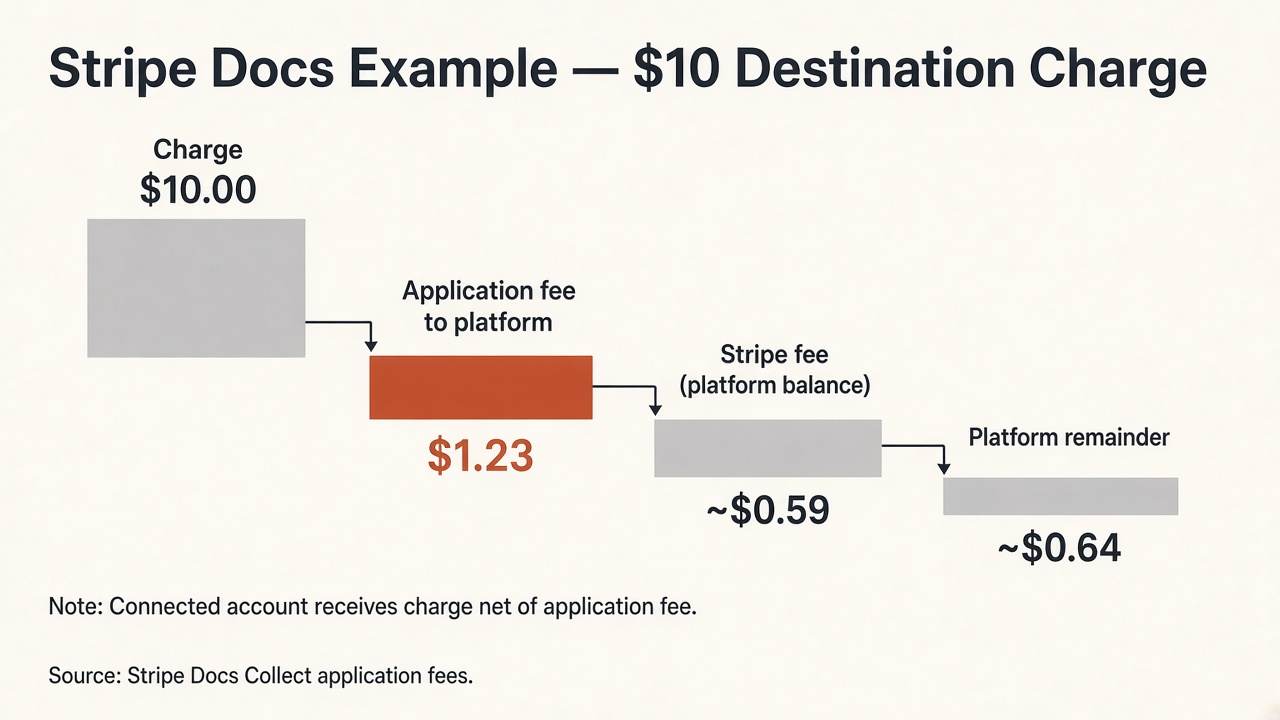
Source: Stripe Docs, Collect application fees (destination charges example). https://docs.stripe.com/connect/marketplace/tasks/app-fees
When the payout graph has more than one connected account, Stripe’s restaurant-delivery example is clearer than forcing everything through one application_fee_amount (Stripe Docs):
| Step | Amount |
|---|---|
| Customer charge | $100.00 |
| Stripe fee (example) | $3.20 |
| Platform pending after Stripe | $96.80 |
| Transfer to restaurant | $70.00 |
| Transfer to driver | $20.00 |
| Platform residual (fee) | $6.80 |
You typically need a ledger if you hold funds longer than a short settlement window. The residual is the monetization. Do not pretend application_fee_amount is mandatory on every Connect shape.
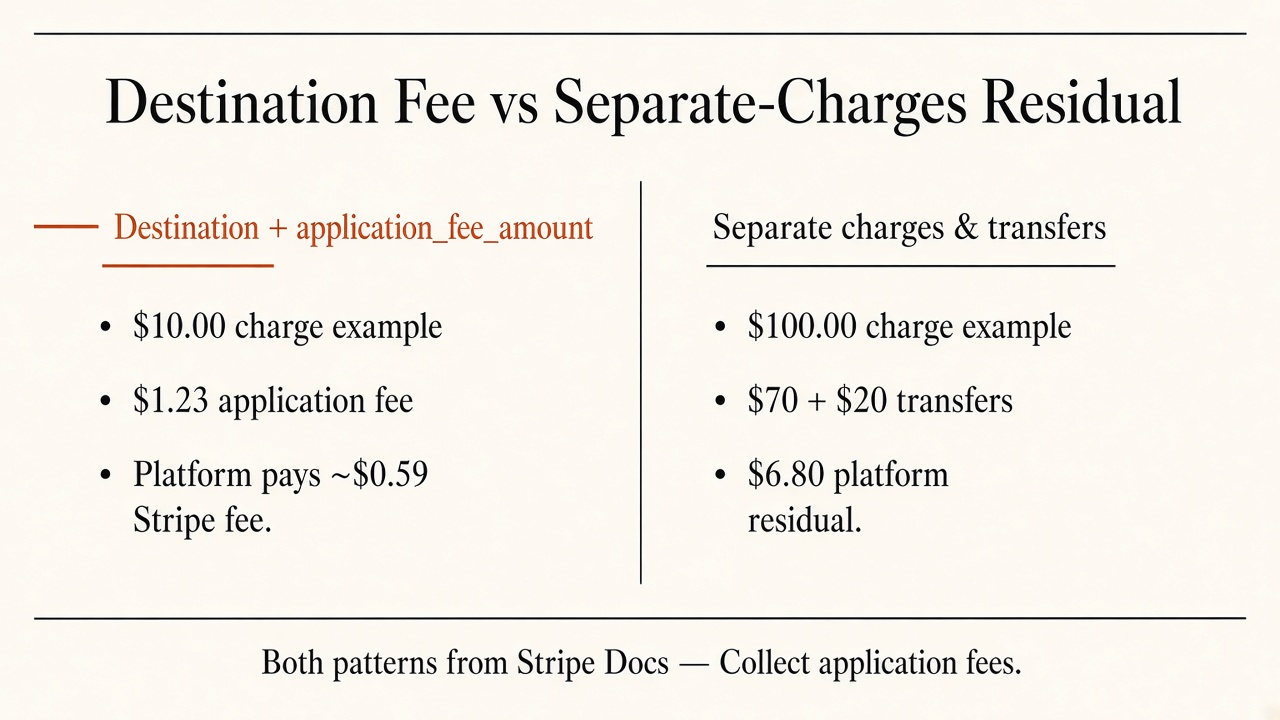
Source: Stripe Docs, Collect application fees. https://docs.stripe.com/connect/marketplace/tasks/app-fees
Set on_behalf_of to a connected account ID when that account should be the settlement merchant. Stripe then settles in that account’s country and currency, uses that country’s fee structure, shows that account’s statement descriptor, and—when countries differ—can show that account’s address and phone on the card statement (Stripe Docs; destination charges).
With certain exceptions, platforms and connected accounts in different regions must use on_behalf_of for destination charges so the connected account is the settlement merchant (Stripe Docs). Pair it with application_fee_amount when you still need a platform cut. Do not use it as a substitute for the fee parameter.
application_fee_amount in cents (or configure Dashboard pricing rules you are willing to override in code).on_behalf_of when settlement branding or cross-border rules require it—not as a fee hack.application_fee_amount is money movement.on_behalf_of as a silent tax. Settlement branding does not mint revenue. Set the fee explicitly.Q: What is application_fee_amount in Stripe Connect? A: It is the parameter that sets how many cents of a destination charge your platform keeps as an application fee. Stripe transfers the full charge to the connected account, then transfers that fee amount back to the platform.
Q: Who pays Stripe’s processing fee when application_fee_amount is set? A: The platform. Stripe debits transaction and related Connect fees from the platform balance after the application fee is collected. Size the application fee so the platform keeps a healthy payments margin.
Q: How is on_behalf_of different from application_fee_amount?
A: on_behalf_of makes a connected account the settlement merchant (descriptor, country, fee structure). application_fee_amount sets the platform’s take-rate on a destination charge. They solve different jobs and are often used together.
Q: Can I use application_fee_amount with separate charges and transfers?
A: Separate charges usually monetize by transferring less than the net (a residual fee). Stripe’s multi-party examples show residual economics without requiring application_fee_amount on every transfer. Match the pattern to your ledger.
Q: Does this article publish feat.’s marketplace fee? A: No. There is no public dataset here for feat. listing fees or platform cut. Live economics stay in-product. The only dollar path cited is Stripe’s documented $10.00 / $1.23 example.
application_fee_amount is a take-rate knob, not a branding flag. Use it on destination charges, size it above Stripe’s platform-paid fees, and reach for transfer residuals when the payout graph needs a ledger. Keep on_behalf_of for settlement truth.
If you want creators selling merchant products through a co-branded storefront with an automatic split, start at feat.—and read fees where they actually live.
Stripe Connect explained for creators: charge types, who pays fees, application fees, and the official pricing fork when Stripe or your platform sets rates.
GoAffPro pricing: Hobby Free, Premium $49, Business from $99. No sales %, vs UpPromote.
GrowSurf pricing: Startup $179, Business $449. Participant tiers, Affiliate Free+$3%, vs ReferralCandy.