AddShoppers vs Omnisend (Cart Email Seat)
AddShoppers vs Omnisend for cart emails: AddShoppers redirects to Minty. Buy Omnisend's live cart automation with published Free/$16/$59 seats.
Mailchimp bills subscribed, unsubscribed, and non-subscribed contacts by peak total. Archived and cleaned drop out. Status matrix + archive levers.

TL;DR: Mailchimp does not bill “subscribers.” It bills your peak contact total across all audiences for the billing cycle. Subscribed, unsubscribed, and non-subscribed contacts count. Archived, cleaned, and deleted contacts do not. Free pauses sends at 250 contacts; paid plans charge add-on blocks when you exceed your contact limit.
Founders ask how does Mailchimp calculate billable contacts after the invoice jumps and the dashboard still says “only 3,200 subscribers.” Those two numbers are different meters. Mailchimp prices the contact table, not the marketing daydream.
If you still equate unsubscribes with “off the bill,” you are reading the wrong column. Opted-out and store-imported non-subscribed records stay in the contact total until you archive, clean, or delete them (Mailchimp Help).
This page is the billing explainer. For the ESP choice against Klaviyo, use Mailchimp vs Klaviyo. For Omnisend’s contact definition, use Klaviyo vs Omnisend. Here the job is one question: what Mailchimp counts, when the peak locks, and which lever actually shrinks the bill.
Key takeaways:
Mailchimp billable contacts are the individual audience members included in your account’s contact total for pricing—subscribed, unsubscribed, and non-subscribed records stored across all audiences—excluding archived, cleaned, and deleted contacts.
That is Mailchimp’s own definition language, compressed into one sentence (Mailchimp Help). “Billable contacts” is the operator phrase. Mailchimp’s help pages say contact, contact total, and contact limit. Same fight.
Statuses on the contact table matter:
| Status | Counts toward contact total? | Can receive marketing email? | Typical source |
|---|---|---|---|
| Subscribed | Yes | Yes (with permission) | Forms, imports with consent |
| Unsubscribed | Yes | No (ads / transactional only) | Opt-out |
| Non-subscribed | Yes | No (ads / transactional only) | Store checkout, inbox, import without marketing opt-in |
| Pending | Must confirm before they fully join as subscribed | Not until confirmed | Double opt-in |
| Cleaned | No (does not count toward total) | No | Bounces / compliance cleaning |
| Archived | No | No while archived | Manual or import archive |
Sources: About your contacts; Non-subscribed contacts; Archive or unarchive; Pricing plans.
Non-subscribed is the silent expander. Someone buys without ticking the marketing box, or lands from a store integration, and still sits in the total because Mailchimp treats that profile as audience data you can still reach with ads or transactional messages (Mailchimp). If you only blast newsletters, those rows are expensive decoration until you archive them.
Wrong headcount is a finance bug that looks like a marketing story.
Why operators search this:
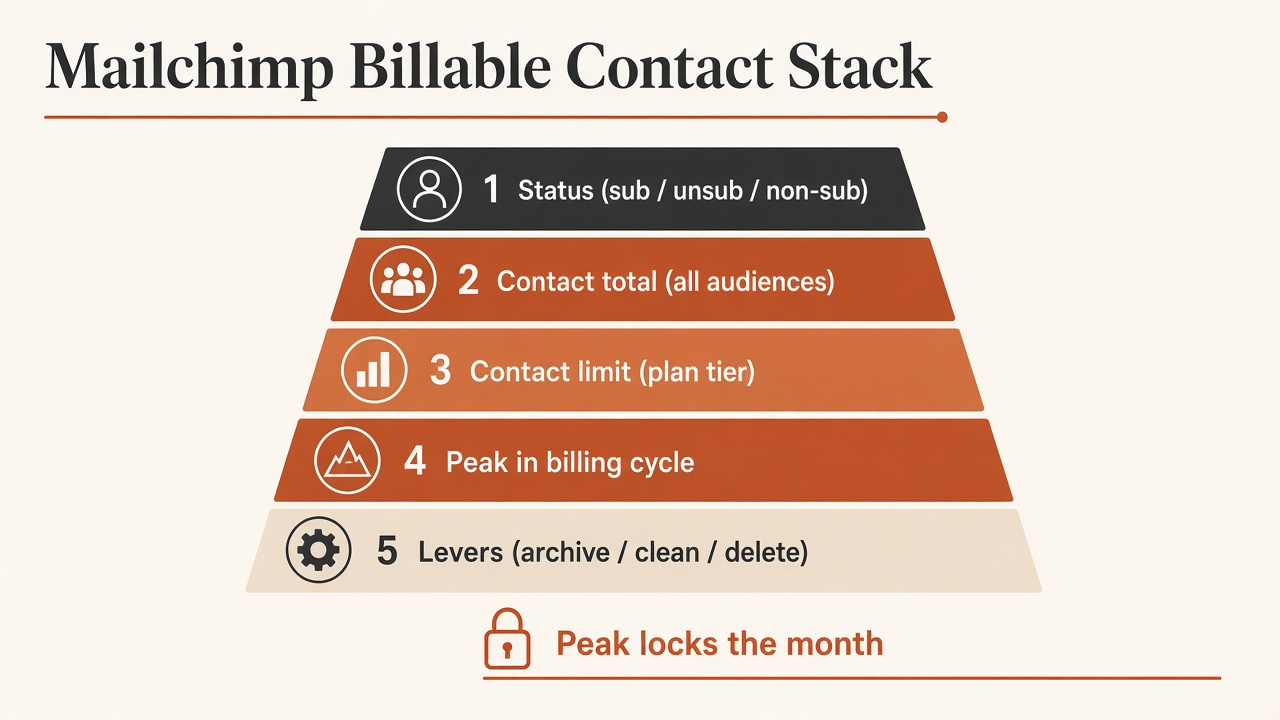
Source: Editorial Mailchimp Billable Contact Stack. Status and peak rules from Mailchimp Help pricing, contacts, and additional-charges pages (accessed 2026-10-11).
Mailchimp calculates the billable headcount as the peak contact total during your billing cycle: every subscribed, unsubscribed, and non-subscribed contact across all audiences, minus archived, cleaned, and deleted records. Plan type sets features and send multipliers; contact limit sets the tier; overages on paid plans become add-on blocks instead of an immediate send pause.
Five layers, in order:
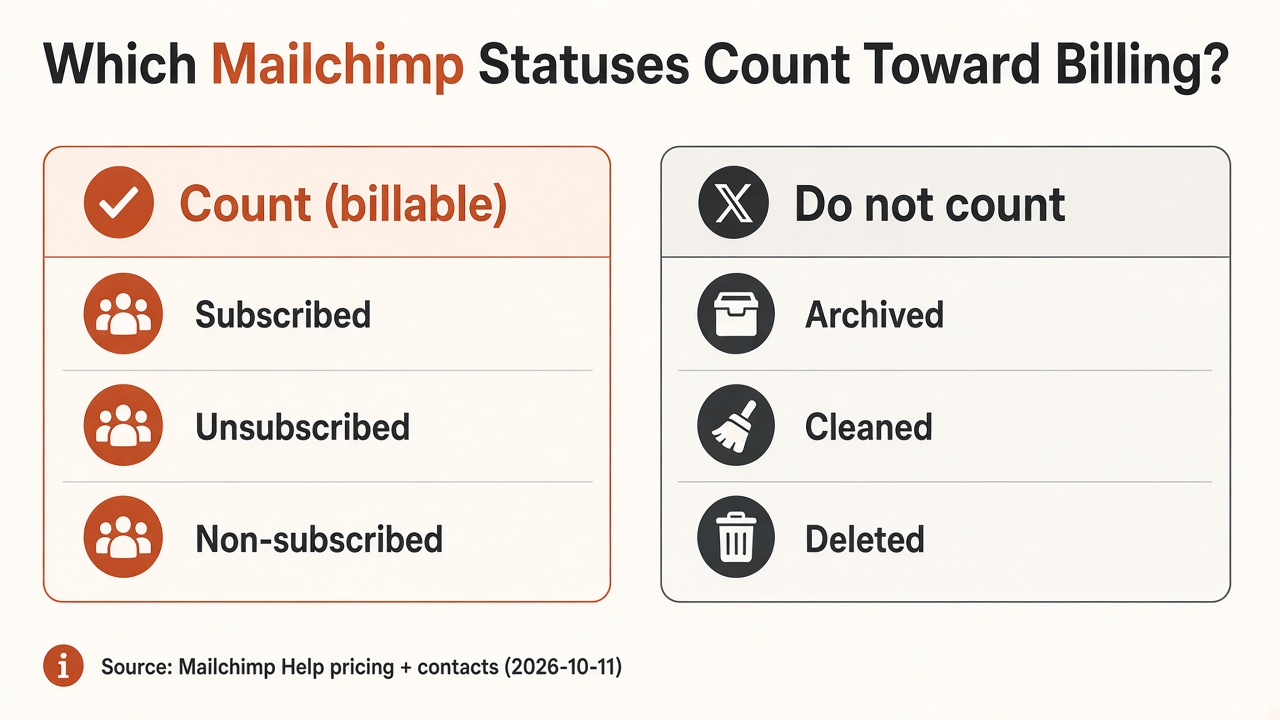
Source: Mailchimp Help — About Mailchimp Pricing Plans; About Your Contacts; About Non-Subscribed Contacts; Archive or Unarchive. https://mailchimp.com/help/about-mailchimp-pricing-plans/
Suppose one audience shows:
Contact total for billing = 4,000 + 1,200 + 800 = 6,000. The 300 archived do not count. If a second audience holds 500 subscribed, add them. Multi-audience accounts get surprised here (Mailchimp).
There is no public dataset for the median share of a Mailchimp contact total that is unsubscribed. One indie-hacker post claimed ~4,000 unsubscribed on the bill before archiving—treat as n=1 anecdote, not a benchmark (r/indiehackers).
| Plan family | Contact ceiling (published) | Send meter | If you exceed contacts |
|---|---|---|---|
| Free | 250 | 500/month (250/day) | Hold on live and test sends until upgrade or reduce |
| Essentials | Base 500; up to 50,000 | 10× contact limit | Add-on contact blocks; service continues |
| Standard | Base 500; up to 100,000 | 12× contact limit | Add-on blocks; Standard example: 1,000 contacts → 12,000 sends in one block |
| Premium | Base 10,000; up to 200,000 (+ custom) | 15× contact limit | Add-on / custom path |
Sources: Pricing plans; Additional charges; Pricing page.
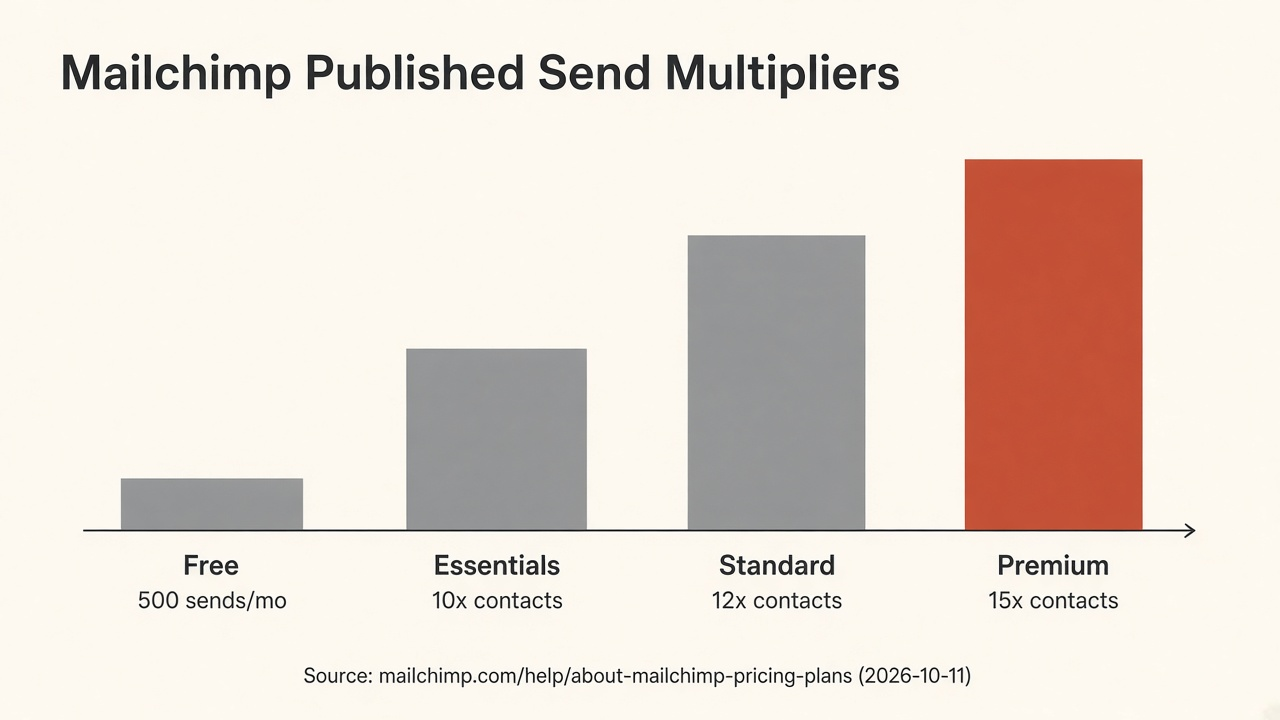
Source: Mailchimp Help About Pricing Plans and pricing/marketing feature table, accessed 2026-10-11. https://mailchimp.com/help/about-mailchimp-pricing-plans/ ; https://mailchimp.com/pricing/marketing/
Temporary spikes still matter. Help copy says if growth is temporary, reduce the audience and keep the lower total for a full billing cycle to avoid future additional charges (Mailchimp). Archiving on day 28 after a day-3 peak does not rewrite day-3 history.
Pair archiving with a real sunset or winback policy so you are not paying for ghosts you already decided not to email. See sunset email flow explained and email deliverability benchmarks. Preference centers cut angry unsubs; they do not remove the contact from the bill by themselves (preference center best practices).
Q: How does Mailchimp calculate billable contacts? A: Mailchimp uses your peak contact total in the billing cycle. Subscribed, unsubscribed, and non-subscribed contacts across all audiences count. Archived, cleaned, and deleted contacts do not. Paid overages become add-on blocks; Free holds sending above 250 contacts.
Q: Do unsubscribed contacts count toward Mailchimp pricing? A: Yes, until you archive, clean, or delete them. Unsubscribed contacts cannot receive marketing email, but they remain in the contact total and still set your tier.
Q: Do non-subscribed contacts count on Mailchimp? A: Yes. Mailchimp’s non-subscribed help states they are included in the contact total and monthly contact limit because they still hold audience data and can receive ads or transactional messages.
Q: Does archiving reduce my Mailchimp bill immediately? A: Archiving removes contacts from the billing tier going forward, but Mailchimp bills the peak total for the current period. To lock a lower tier, keep the reduced total for a full billing cycle after a spike.
Q: Is Mailchimp’s contact math the same as Klaviyo’s? A: No. Mailchimp bills a contact total that still includes unsubscribed and non-subscribed rows until archive. Klaviyo bills active profiles and drops suppressed profiles from that meter. Compare platforms only after you align definitions.
Mailchimp calculates billable contacts as a peak contact total, not a subscriber vanity metric. Count subscribed, unsubscribed, and non-subscribed across every audience; archive what you will not market; and remember Free pauses while paid adds blocks. When the cleanup is done and the job is still “which ESP,” read the comparison spokes—then get back to offers people actually buy. If you are building distribution through co-branded creator storefronts rather than another ESP invoice, start at feat..
AddShoppers vs Omnisend for cart emails: AddShoppers redirects to Minty. Buy Omnisend's live cart automation with published Free/$16/$59 seats.
GetResponse double opt-in is off by default. Enable the list confirmation toggle, match form surfaces, and remember DOI alone is not GDPR compliance.
Mailing CPM is cost per 1,000 list recipients. Use Carroway size-band medians ($62.50→$7.77) and placement types—not one fake “good CPM.”