AddShoppers vs Omnisend (Cart Email Seat)
AddShoppers vs Omnisend for cart emails: AddShoppers redirects to Minty. Buy Omnisend's live cart automation with published Free/$16/$59 seats.
Browse abandonment best practices: pick the trigger seat, wait, exit into cart/checkout, set re-entry, then write a lighter sequence than cart.

TL;DR: Browse abandonment best practices are a five-rung filter ladder, not a prettier cart email. Name the trigger seat (Klaviyo Viewed Product vs Omnisend page browse vs product abandonment), wait at least an hour, exit anyone who adds to cart or starts checkout, set a 10-30 day re-entry clock, then send a lighter 1-3 message sequence. Omnisend’s Page viewed earns $0.76/email versus cart $3.59; Klaviyo browse RPR averages $1.07 versus cart $3.65.
Most “browse abandonment best practices” posts start with pretty templates. That is backwards. If the filters are wrong, the prettiest email discounts the shopper who already holds a cart.
This page owns the ops playbook. The scorecard lives in browse abandonment email benchmarks. Subject copy lives in browse abandonment email subject lines. Cart recovery lives in abandoned cart email benchmarks.
Browse abandonment best practices are the configuration rules for automated messages sent after an identified shopper views a page or product without adding to cart: which metric triggers the flow, how long you wait, which higher-intent events exit them, how often they may re-enter, and how light the content should stay relative to cart and checkout recovery.
They are not a second abandoned cart with a softer subject line. Klaviyo’s Help Center says browsing is a lighter touchpoint than cart because viewing a product is weaker intent than adding it or starting checkout (Klaviyo Help). Omnisend splits the early funnel further: page-level Browse Abandonment, Product Abandonment, then Abandoned Cart and Abandoned Checkout (Omnisend Help).
If you only remember one sentence: configure exits before you debate coupons.
Browse abandonment best practices matter because most product-page sessions never become carts, and the cheapest way to burn that traffic is to message the wrong people with the wrong weight.
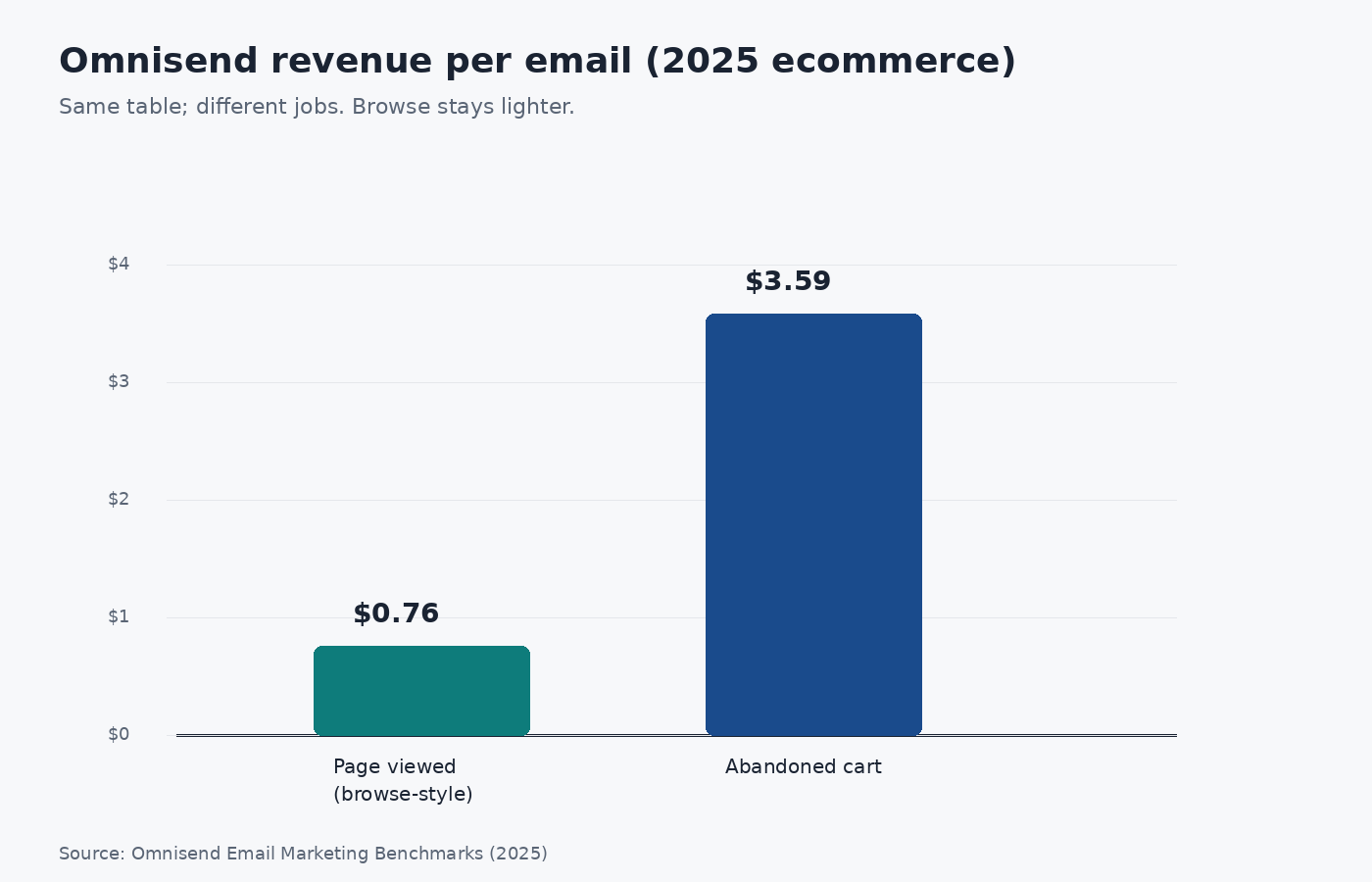
Source: Omnisend Email Marketing Benchmarks (2025 ecommerce automation data). https://www.omnisend.com/blog/email-marketing-benchmarks/
Browse abandonment best practices work as a five-rung Browse Flow Filter Ladder: pick the trigger seat, set a wait floor, install the exit stack, set the re-entry clock, then choose content weight. Skip a rung and the sequence fights cart recovery even if the creative looks fine.
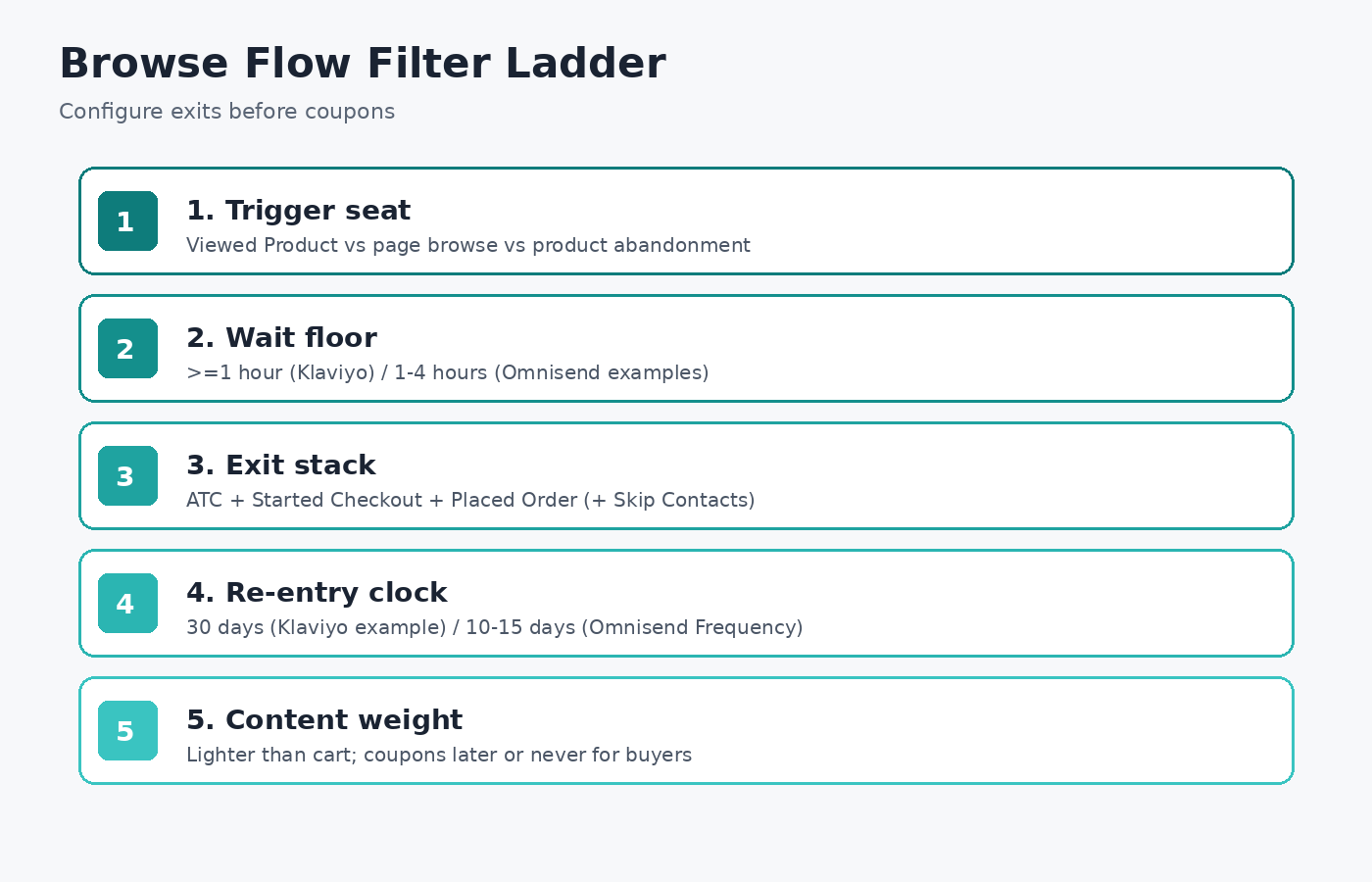
Source: Synthesized from Klaviyo Help (Oct 2026) and Omnisend Help (2026). https://help.klaviyo.com/hc/en-us/articles/115002775252 · https://support.omnisend.com/en/articles/1692754-browse-abandonment-automation
| Rung | Decision | Default you can defend |
|---|---|---|
| 1. Trigger seat | Which metric means “browse”? | Klaviyo: Viewed Product. Omnisend: page-level Browse Abandonment for homepage/collection/sale; Product Abandonment for product pages without ATC. |
| 2. Wait floor | How long before the first send? | Klaviyo: at least one hour. Omnisend examples: first email 1-4 hours after browsing. |
| 3. Exit stack | Who must leave immediately? | Zero times since starting this flow: Added to Cart, Started Checkout, Placed Order (plus Omnisend Skip Contacts for higher-priority flows). |
| 4. Re-entry clock | How often may the same person re-enter? | Klaviyo Help default example: hasn’t been in this flow in the last 30 days. Omnisend: Frequency 10-15 days. |
| 5. Content weight | How hard do you sell? | Lighter than cart: reminder and product/collection context first; coupons later or not at all for repeat buyers. |
Klaviyo’s browse abandonment flow is a Viewed Product metric flow. You need onsite Viewed Product tracking live before the ladder matters (Klaviyo Help).
Omnisend’s library item named Browse Abandonment is not the same seat. It targets contacts who viewed a homepage, collection, or sale page without viewing a specific product or adding to cart. Product page views without ATC belong in Product Abandonment. Cart and checkout have their own workflows (Omnisend Help).
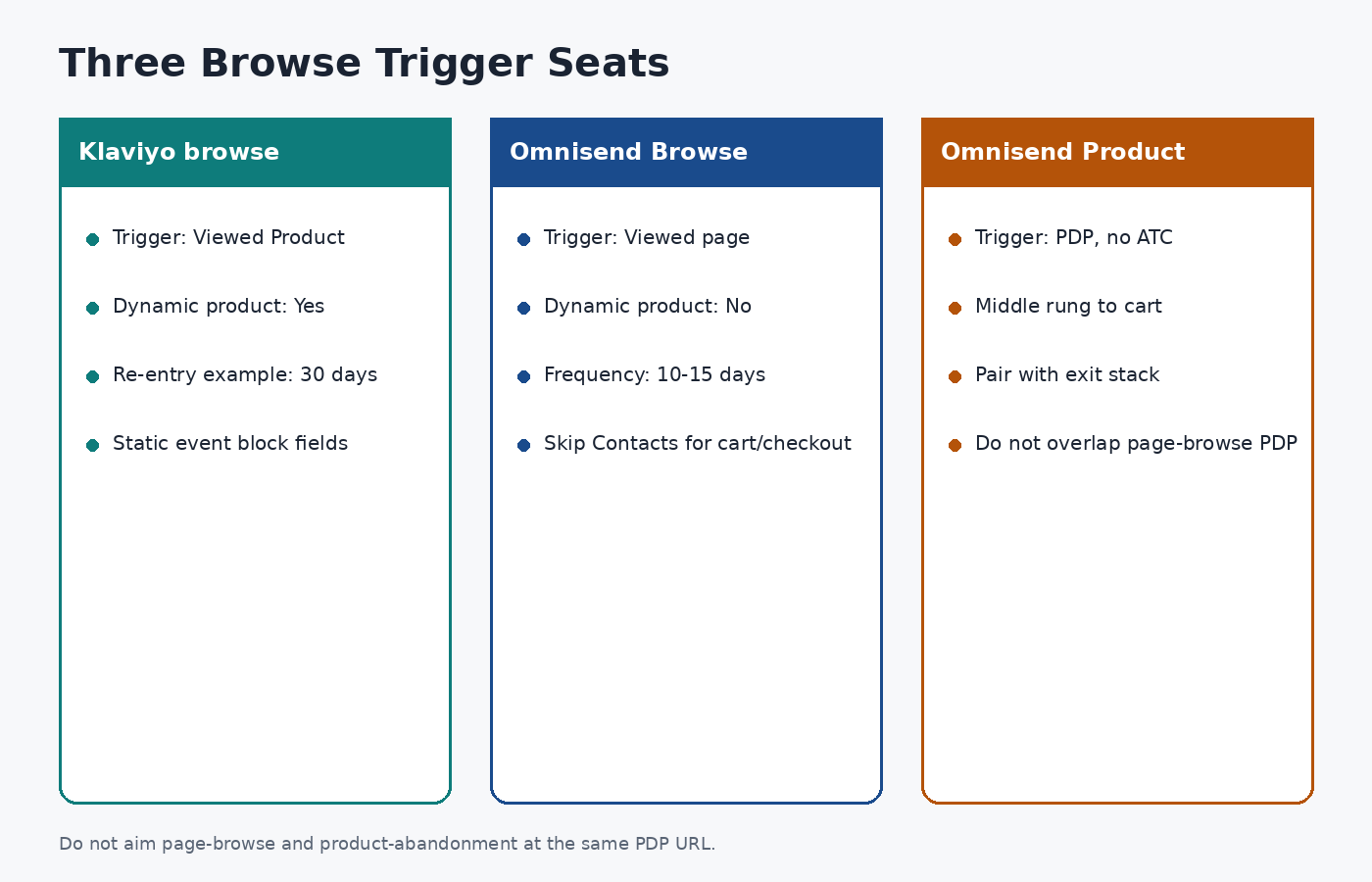
Source: Klaviyo Help and Omnisend Help, accessed 2026-10-12. https://help.klaviyo.com/hc/en-us/articles/115002775252 · https://support.omnisend.com/en/articles/1692754-browse-abandonment-automation
| Seat | Typical trigger | Dynamic product in email? | Use when |
|---|---|---|---|
| Klaviyo browse | Viewed Product | Yes (event.ImageURL, name, price, URL) if Static product block is built correctly |
Shopify/BigCommerce (or custom) with Viewed Product tracking |
| Omnisend Browse Abandonment | Viewed page (filter to /collections/, /sale, homepage) |
No product image/name/price or return URL | Early collection/sale browsers; Product Abandonment covers PDP |
| Omnisend Product Abandonment | Product page view without ATC | Product-level (sibling workflow) | PDP browsers who never cart |
Operators on r/Klaviyo still ask whether cart people “must” also be in browse. The answer is only if your exits are broken. Distinct messaging helps. Competing sends do not (r/Klaviyo).
Klaviyo’s documented build uses a delay of at least one hour after Viewed Product before the first message (Klaviyo Help). Omnisend’s 2026 examples blog places Email 1 at one to four hours, Email 2 at 24-48 hours, and optional Email 3 at three to five days, for a one to three email sequence over about one to five days (Omnisend).
Do not fire at minute five. You interrupt people still on the site and you collide with cart triggers that have not had time to fire.
Klaviyo’s recommended profile filters for a DIY browse flow are explicit (Klaviyo Help):
Omnisend’s Help Center defaults exit on Placed order and tells you to add Added product to cart and Started checkout when those sibling workflows are live, plus Skip Contacts so someone already in Abandoned Cart or Abandoned Checkout never enters browse (Omnisend Help).
Profile filters must re-check before later sends. A trigger-only check at entry is how purchasers keep getting reminders. That distinction shows up constantly in Klaviyo operator threads (r/Klaviyo).
Frequent browsers will re-trigger Viewed Product all day. Klaviyo’s Help example uses “hasn’t been in this flow in the last 30 days” (Klaviyo Help). Omnisend recommends Frequency 10-15 days so regular visitors are not emailed on every session (Omnisend Help; Omnisend blog).
Pick a clock you can explain to support. Then leave Smart Sending on for browse unless you have a documented exception.
Content is last because wrong filters make great copy expensive.
event.ImageURL, event.Name, event.Price, and event.URL (Klaviyo Help).Thin catalogs, almost no identifiable browsers, or a cart flow that already underperforms are reasons to wait. Omnisend only fires browse for cookie-identified contacts (email click, signup form, or checkout email submit). A giant list with no cookies is a silent workflow (Omnisend Help). Fix identification before you debate creative.
Affiliate and creator storefront traffic still needs the same ladder: if a co-branded page is your acquisition surface, browse is how you recover soft intent without pretending every click was a cart. Merchants listing offers for distribution can start at feat..
Q: What are browse abandonment best practices in one sentence? A: Name the trigger seat, wait at least an hour, exit cart and checkout profiles, limit re-entry to about 10-30 days, then send a lighter 1-3 message sequence than your cart flow. The dollar gap (Omnisend $0.76 vs $3.59; Klaviyo RPR $1.07 vs $3.65) is why browse stays light.
Q: How do Klaviyo browse abandonment filters differ from Omnisend? A: Klaviyo’s documented browse flow uses Viewed Product with profile filters for zero ATC, checkout, and orders since starting the flow, plus a common 30-day re-entry filter. Omnisend’s Browse Abandonment is page-level, pairs with Product Abandonment for PDPs, and relies on Frequency (10-15 days) plus Skip Contacts for higher-priority cart/checkout workflows.
Q: How many emails should a browse abandonment sequence include? A: Omnisend’s 2026 examples guide recommends one to three emails over about one to five days (1-4 hours, then 24-48 hours, optional 3-5 days). More than that usually means your re-entry clock or exits are wrong, not that you need more creative.
Q: Should browse abandonment emails include a discount? A: Not by default on email 1. Omnisend’s examples keep the first send incentive-light and test perks later. Klaviyo’s Help Center suggests discounts more often for never-purchased browsers than for returning buyers. Subject-line data in our spoke also shows hard discounts underperforming that sample’s top patterns.
Q: Is browse abandonment the same as cart abandonment? A: No. Browse fires after a page or product view without a cart. Cart fires after an add-to-cart (or checkout start, depending on your ESP labels). Same-table Omnisend numbers show browse wins CTR while cart wins dollars and conversion; treat them as different jobs with different exits.
Browse abandonment best practices are filter engineering with a content coda. Climb the Browse Flow Filter Ladder: seat, wait, exits, re-entry, then weight. Judge the flow on CTR and RPR next to the public Omnisend and Klaviyo ladders, and keep cart recovery as the higher-intent sibling. When your offer needs co-branded creators selling through storefronts instead of another discount email, list it on feat..
AddShoppers vs Omnisend for cart emails: AddShoppers redirects to Minty. Buy Omnisend's live cart automation with published Free/$16/$59 seats.
GetResponse double opt-in is off by default. Enable the list confirmation toggle, match form surfaces, and remember DOI alone is not GDPR compliance.
Mailing CPM is cost per 1,000 list recipients. Use Carroway size-band medians ($62.50→$7.77) and placement types—not one fake “good CPM.”